Key Takeaways: Microsoft Teams Telephony and Direct Routing
-
Microsoft Teams Direct Routing connects Teams Phone to an external telecommunications provider through a compatible Session Border Controller (SBC) infrastructure.
-
Users can make and receive external phone calls directly from Microsoft Teams with the appropriate licenses and configuration.
-
Direct Routing allows businesses to choose their VoIP provider instead of relying exclusively on Microsoft Calling Plans.
-
modulus provides Direct Routing with Greek phone numbers, number portability, and technical support throughout deployment.
-
Direct Routing is particularly useful when a business wants to retain its telecommunications provider, leverage existing infrastructure, or support more advanced call-routing scenarios.
-
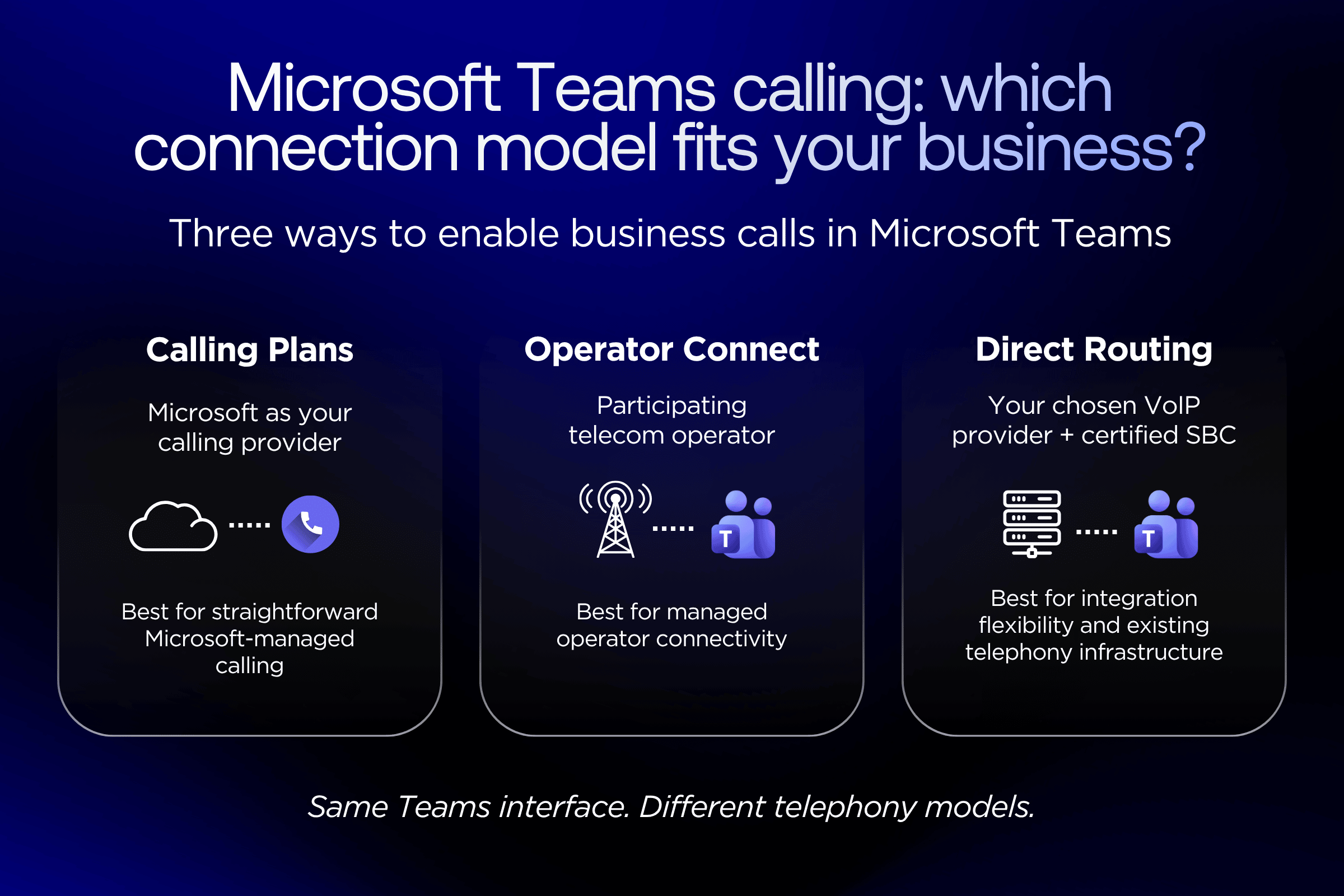
Microsoft Calling Plans and Operator Connect are also available PSTN connectivity options. Direct Routing is not necessarily the best solution for every business.
-
Integrating telephony into Teams supports a broader Unified Communications as a Service (UCaaS) strategy, bringing voice, meetings, and collaboration together within a shared environment.
What Is Microsoft Teams Direct Routing?
Microsoft Teams Direct Routing is a method of connecting Microsoft Teams Phone to the Public Switched Telephone Network (PSTN) through an external telecommunications provider and a certified Session Border Controller (SBC).
This allows Teams users to call phone numbers outside their organization and receive incoming calls on their business numbers.
Microsoft Teams provides the interface for communication, while the telecommunications provider delivers the underlying connectivity to the public telephone network.
Microsoft supports different PSTN connectivity models. Direct Routing is designed for organizations that need greater flexibility in choosing their provider, integrating existing phone systems, or managing call routing.
What Is the Difference Between Microsoft Teams and Microsoft Teams Phone?
Microsoft Teams is primarily a collaboration platform offering chat, meetings, video calls, file sharing, and communication between users.
Microsoft Teams Phone adds business phone system capabilities, including call handling, transfers, call queues, and auto attendants, depending on licensing and configuration.
However, making external calls to landlines and mobile numbers also requires connectivity to the public telephone network.
This can be provided through Microsoft Calling Plans, Operator Connect, Direct Routing, or other supported connectivity options for specific requirements.
Therefore, Microsoft Teams Phone provides the phone system features, while Direct Routing is one of the methods used to connect that system to the public telephone network.
How Does Microsoft Teams Direct Routing Work?
The basic Direct Routing architecture consists of four components:
1. Microsoft Teams & Teams Phone
The application environment where users make and receive calls.
↓
2. Certified Session Border Controller (SBC)
The connection between Microsoft Teams and the telecommunications provider.
↓
3. VoIP Provider / SIP Trunk
The provider of phone numbers, voice services, and telephone network connectivity.
↓
4. Public Switched Telephone Network (PSTN)
The network enabling external calls to landlines and mobile phones.
Simplified Microsoft Teams Direct Routing architecture.
The Session Border Controller (SBC) acts as the interconnection point between Microsoft Teams Phone and the VoIP provider's telecommunications infrastructure. It enables the exchange of voice traffic between the connected systems according to the requirements of the Direct Routing architecture. In a managed cloud deployment, the SBC infrastructure can be hosted and maintained by the provider, eliminating the need for businesses to install their own physical SBC on-site.
With a managed cloud solution, such as the integration offered by modulus, businesses do not need to install their own physical SBC on-site.
This does not mean Direct Routing works without an SBC. Instead, the required infrastructure can be hosted and managed externally, reducing the need for additional on-premises telecommunications equipment.
When Does a Business Need Microsoft Teams Direct Routing?
A business needs Microsoft Teams Direct Routing when it wants to use Microsoft Teams for external phone calls while retaining flexibility over its telecommunications provider, existing phone numbers, or integration with other telephony systems.
Not every organization using Teams needs Direct Routing.
The decision depends on specific operational and technical requirements.
1. When You Want to Make Business Calls Directly from Teams
Many businesses already use Microsoft Teams daily for internal communication, video meetings, and collaboration.
However, employees may still rely on a separate application, desk phone, or softphone for external telephone calls.
With Direct Routing, business telephony can be integrated into the same working environment.
An employee can participate in a Teams meeting and then make a business call to an external phone number through the same application.
This reduces the need to switch between communication tools throughout the day, although it does not necessarily mean every telephony requirement can be covered by a single platform.
2. When You Want to Keep Your Existing Business Phone Numbers
Moving to a new communication platform does not necessarily mean changing your phone numbers.
Through Direct Routing and number portability services, businesses can continue using their existing numbers within the new telephony environment, provided the relevant requirements are met.
This is particularly important for numbers already published on websites, business cards, invoices, commercial documentation, and customer service channels.
modulus supports Greek phone numbers and number portability for Microsoft Teams, allowing businesses to move to Teams telephony while retaining the phone numbers their customers already know.
3. When You Need a Telecommunications Provider Other Than Microsoft
Direct Routing enables businesses to choose a telecommunications provider that matches their requirements rather than relying exclusively on Microsoft Calling Plans.
This can be valuable when an organization needs specific phone numbers, local technical support, specialized voice services, or a different telecommunications pricing model.
However, choosing a provider should not be based solely on the cost per call minute.
Service availability, technical support, routing quality, integration expertise, and overall operational costs are equally important considerations.
4. When Your Team Works Across Multiple Locations
For businesses with hybrid or remote teams, having a shared communication environment becomes particularly valuable.
Employees can make and receive business calls through the Teams application on their computers or mobile devices, using their corporate phone numbers with the appropriate configuration.
This means everyday business communication no longer depends exclusively on a physical desk phone at the office.
It can be particularly useful for businesses with remote employees, sales teams, or operations across multiple locations.
5. When You Need to Connect Teams to Existing Telephony Infrastructure
A business may already operate corporate PBX, SIP Trunks, or specialized telephony applications.
Moving to Microsoft Teams does not necessarily mean replacing its entire communications infrastructure immediately.
Direct Routing can support architectures in which Teams coexists with existing phone systems, depending on compatibility, SBC capabilities, and the overall solution design.
For organizations planning a gradual transition to cloud communications, this flexibility may be more valuable than simply bringing multiple communication applications together.
Microsoft Teams Direct Routing vs Calling Plans vs Operator Connect: What Are the Differences?
The main options for enabling external calling through Microsoft Teams Phone are Microsoft Calling Plans, Operator Connect, and Direct Routing.
All three provide connectivity between Teams and the public telephone network. However, they differ in how the service is delivered, who manages the infrastructure, and how much flexibility businesses have when selecting a provider.
| Feature |
Microsoft Calling Plans |
Operator Connect |
Direct Routing |
| Telephony provider |
Microsoft |
Participating Operator Connect provider |
Chosen PSTN/VoIP provider |
| Connection management |
Microsoft-managed |
Primarily managed by the operator |
Managed by the organization or a managed provider |
| SBC requirements |
No customer-managed SBC required |
No customer-managed SBC required |
Certified SBC solution required |
| Existing PBX integration |
Not designed primarily for PBX integration |
More limited integration flexibility |
Supported through appropriate architecture |
| Routing flexibility |
Standardized model |
Depends on the service |
Greater configuration flexibility |
| Best suited for |
Straightforward Microsoft-managed calling |
Managed connectivity through a participating operator |
Specialized requirements, existing infrastructure, and deployment flexibility |
Comparison based on official Microsoft documentation. Availability, supported phone numbers, and specific capabilities vary by country and provider.
The best Microsoft Teams calling option depends on your organization's requirements. Microsoft Calling Plans may suit businesses looking for straightforward Microsoft-managed telephony, while Operator Connect offers connectivity through participating telecommunications providers. Direct Routing is particularly valuable when businesses need greater flexibility in provider selection, existing PBX integration, or customized call-routing configurations. Availability and supported features vary by country and provider.
How Does modulus Integrate VoIP Telephony with Microsoft Teams?
modulus provides Microsoft Teams telephony through Direct Routing, connecting Microsoft Teams to its VoIP infrastructure so employees can make and receive business phone calls directly through Teams.
The service combines Microsoft's collaboration capabilities with modulus telephony, numbering, and SIP Trunking services.
Specifically, the solution includes:
-
Greek business phone numbers, either newly assigned or retained through number portability.
-
Incoming and outgoing external calls through Microsoft Teams.
-
Connectivity to the public telephone network through modulus' VoIP infrastructure.
-
Direct Routing configuration handled by a specialized team.
-
Cloud-based deployment without requiring businesses to install a physical SBC on-site.
-
Technical support for service activation and ongoing operation.
modulus provides further details about the solution and deployment process on its Microsoft Teams Direct Routing for businesses page.
Why Does Choosing the Right VoIP Provider Matter?
In Microsoft Teams telephony, choosing a provider affects more than the ability to make phone calls.
The telecommunications provider forms part of the infrastructure connecting employees to the public telephone network.
Its evaluation should therefore include phone number availability, network reliability, technical support, and the ability to connect with other telephony environments.
For businesses operating in Greece, access to local technical support and the ability to retain existing business numbers can also offer important practical advantages.
modulus provides business VoIP telephony services that can be used within Microsoft Teams through the relevant integration.
The value lies not simply in connecting two platforms, but in allowing businesses to combine a familiar working environment with specialized telecommunications services.
What Business Opportunities Does Microsoft Teams Phone Integration Create?
Integrating telephony into Microsoft Teams allows businesses to extend their collaboration environment into a more comprehensive communications system.
However, the value does not come solely from bringing more features into one application.
It comes from improving day-to-day coordination, simplifying access to business telephony, and creating an infrastructure that can evolve alongside the organization.
Bringing Business Telephony and Everyday Collaboration Together
In a typical workplace, an employee may use Teams for internal chat and meetings while relying on a different application for business calls.
Telephony integration helps bridge that gap.
Users can make external calls directly from Teams while continuing to use the collaboration features they already rely on.
This reflects the concept of Unified Communications (UC): voice is no longer treated as a standalone function, but as part of a connected business communication environment.
Supporting Hybrid and Remote Work
For businesses with employees working from different locations, accessing business telephony through Teams reduces dependence on a physical office.
Employees can use their corporate phone numbers on supported devices, provided they have internet connectivity and the appropriate configuration.
This allows telephone communication to fit more naturally into hybrid working models.
Centralized Management of Phone System Features
With Teams Phone, businesses can use features such as call queues, auto attendants, call management, and telephony policies, depending on their licensing.
This allows IT teams to manage certain aspects of business telephony within the Microsoft Teams ecosystem.
However, management responsibilities remain distributed between Microsoft, the telephony connectivity provider, and, where applicable, the SBC infrastructure.
Integration therefore does not eliminate the need for clearly defined technical support responsibilities.
Flexibility for Future Business Requirements
Today, a business may only need external calling from Microsoft Teams.
Later, it may need to support additional locations, more phone numbers, customer service teams, or specialized telephony applications.
A well-designed Direct Routing architecture can offer greater flexibility for these types of expansions.
The important point is to view integration not as an isolated technical configuration, but as part of the organization's wider business communications strategy.
Microsoft Teams Direct Routing in Practice: An SME Business Example
Consider a professional services company with 35 employees.
The team already uses Microsoft Teams for internal collaboration, meetings, and file sharing.
However, it relies on a separate phone system for everyday customer communication.
As a result, employees work across two different communication environments: one for internal collaboration and another for external telephone calls.
Before the Integration
Employees use Teams for meetings and chat, while external business calls are handled through a separate softphone or desk phone.
The IT team needs to manage these environments independently.
At the same time, the business wants to retain the phone numbers its customers already recognize.
After Implementing Direct Routing
With the appropriate Teams Phone licensing and Direct Routing integration, employees can make and receive external telephone calls directly through Teams.
The business can retain its phone numbers through number portability and use the services of its selected VoIP provider.
Depending on the deployment architecture, Teams Phone features can also be used to route incoming calls to users or groups.
The practical outcome is a simpler working environment without requiring the business to replace the collaboration platform its employees already know.
The real improvement is not that another feature has been added to Teams. It is that telephony has been adapted to the way the team already works.
What Do You Need to Enable Microsoft Teams Direct Routing?
To use Microsoft Teams for external business calling through Direct Routing, an organization needs appropriate Microsoft Teams Phone licensing, a PSTN/VoIP provider, compatible SBC infrastructure, and the necessary technical configuration.
Simply installing Microsoft Teams is not enough to enable external telephone calls.
What Microsoft Licenses Are Required?
Users who make and receive external calls need the appropriate Teams Phone license, either included in an eligible subscription or purchased as an add-on, depending on their Microsoft 365 plan.
They must also have the necessary licensing and access to Microsoft Teams.
To make and receive external calls through Microsoft Teams Direct Routing, users need the appropriate Microsoft Teams Phone licensing and connectivity to a PSTN/VoIP provider. A Microsoft Calling Plan is not required for PSTN connectivity delivered through Direct Routing. However, the exact licensing requirements depend on the Microsoft 365 subscription, user type, and deployment configuration.
Before deployment, businesses should verify user licenses, available tenant features, and their specific telephony requirements.
Does Your Business Need to Purchase a Session Border Controller?
Microsoft Teams Direct Routing requires compatible, Microsoft-certified SBC infrastructure, but this does not necessarily mean that a business must purchase and install physical equipment.
In a managed Direct Routing model, the SBC infrastructure can be provided by the telecommunications provider or systems integrator.
modulus' VoIP integrations with communication and collaboration platforms use cloud infrastructure, reducing the need for additional on-premises telecommunications equipment.
How Is Microsoft Teams Direct Routing Implemented?
The deployment process can be organized into four main stages.
1. Requirements Assessment
The business identifies the users, telephone numbers, inbound and outbound calling requirements, licensing needs, and any existing telephony infrastructure.
2. Telephony Service Activation
New phone numbers are provisioned, or the portability of existing numbers is arranged where necessary.
3. Microsoft Teams Configuration
The required connection to the VoIP infrastructure is established, including Direct Routing settings, user configuration, and call-routing policies.
4. Testing and Service Activation
Incoming and outgoing calls, phone numbers, routing behavior, and key usage scenarios are tested before the service goes live.
For additional information about the service and its implementation requirements, see the modulus Microsoft Teams Direct Routing overview.
Is Microsoft Teams Direct Routing Cheaper Than Calling Plans?
Microsoft Teams Direct Routing can offer cost advantages, but it is not automatically cheaper than Microsoft Calling Plans for every business.
The total cost depends on the number of users, required licenses, phone numbers, call volumes and destinations, and the service delivery model.
For a company already working with a VoIP provider or operating more complex telephony infrastructure, Direct Routing may provide better value by allowing existing services to be retained.
For a smaller team with straightforward calling requirements, however, an available Microsoft Calling Plan may be a simpler option.
The comparison should therefore focus on Total Cost of Ownership (TCO) rather than outgoing call rates alone.
How Do You Choose a Microsoft Teams Phone Provider for Your Business?
Choosing a Microsoft Teams Direct Routing provider should involve assessing whether it can support both your current calling requirements and your organization's future communication needs.
Before selecting a solution, consider the following:
-
Phone number availability: Can the provider supply or support the business phone numbers you need?
-
Number portability: Can your existing phone numbers be retained?
-
Direct Routing expertise: Can the provider handle deployment and the required technical configuration?
-
Support model: Who is responsible for troubleshooting issues related to PSTN connectivity?
-
Reliability and quality: How is the underlying telecommunications infrastructure designed?
-
Scalability: Can the solution accommodate additional users, phone numbers, or locations?
-
Total cost: How do Microsoft licensing, telephony services, and implementation costs combine?
For Greek SMEs, working with a provider that understands both the telecommunications market and Microsoft Teams integration can significantly reduce deployment complexity.
modulus combines VoIP telephony, SIP Trunking, business numbering, and Direct Routing configuration services, enabling businesses to use Teams as their everyday business calling environment.
Microsoft Teams Telephony: The Goal Is Not to Add Another Tool
Businesses already have access to more communication applications than ever before.
The real question is not necessarily which new platform they should adopt, but how they can make better use of the tools they already have.
Microsoft Teams is a clear example. For a business that uses it every day for collaboration, adding external telephony can be a natural extension of its existing communication environment.
Direct Routing introduces an important additional dimension: it allows this evolution to take place while retaining the freedom to choose a telecommunications provider and make use of existing telephony services.
It is not necessarily the right answer for every organization.
However, when a business needs flexibility, wants to retain its telephony infrastructure, and aims to unify communication, Direct Routing represents a particularly valuable architectural option.
The value of integration is measured not only by the systems it connects, but also by the operational complexity it removes.
For businesses evaluating Microsoft Teams telephony, this may be the most important consideration of all.